Guide
How to Make an Oh You Can Make It Cap AI Video
You can make an oh you can make it cap AI video from one or two photos in about 15 minutes. You do not need to write a prompt or edit anything. This guide walks through each choice and shows a real result we made with two AI-generated people.
Last updated: Oct 28, 2026
Key facts
- An oh you can make it cap AI video is 15 seconds long and has 11 shots that alternate between two roles.
- Photo 1 becomes the laughing role and Photo 2 the spinning role; a single photo can cover both.
- Our 720p test video was generated in about 4.5 minutes; the sound was then lined up and leveled automatically.
- At current pack prices, one video costs $4 to $6 at 480p and $8 to $12 at 720p.
- Uploaded photos are deleted after 14 days, and finished videos stay in My videos for 30 days.
What happens in an oh you can make it cap AI video
Every oh you can make it cap AI video follows the same plan. It runs 15 seconds and cuts 10 times. Person A laughs in six shots and Person B spins and talks in five. The video always ends on Person A. You can read the meaning of each moment in the meme guide.

Who plays which role
The two photo slots map to the two roles. The order matters, so decide who should laugh before you upload.
Photo 1 plays the person who laughs
This person points, bites a finger and laughs behind a hand. Choose a photo where the face is big and clear. Laughing shots are close, so the face carries the role.
Photo 2 plays the person who spins
This person spins, looks back over the shoulder and talks with a straight face. The spin shows hair and clothes from behind, so a clear upper body helps.
One photo can play both roles
Turn on "Just me" and the same person plays both parts. This works well for a solo post, since you get to laugh at yourself.
A real result from two photos
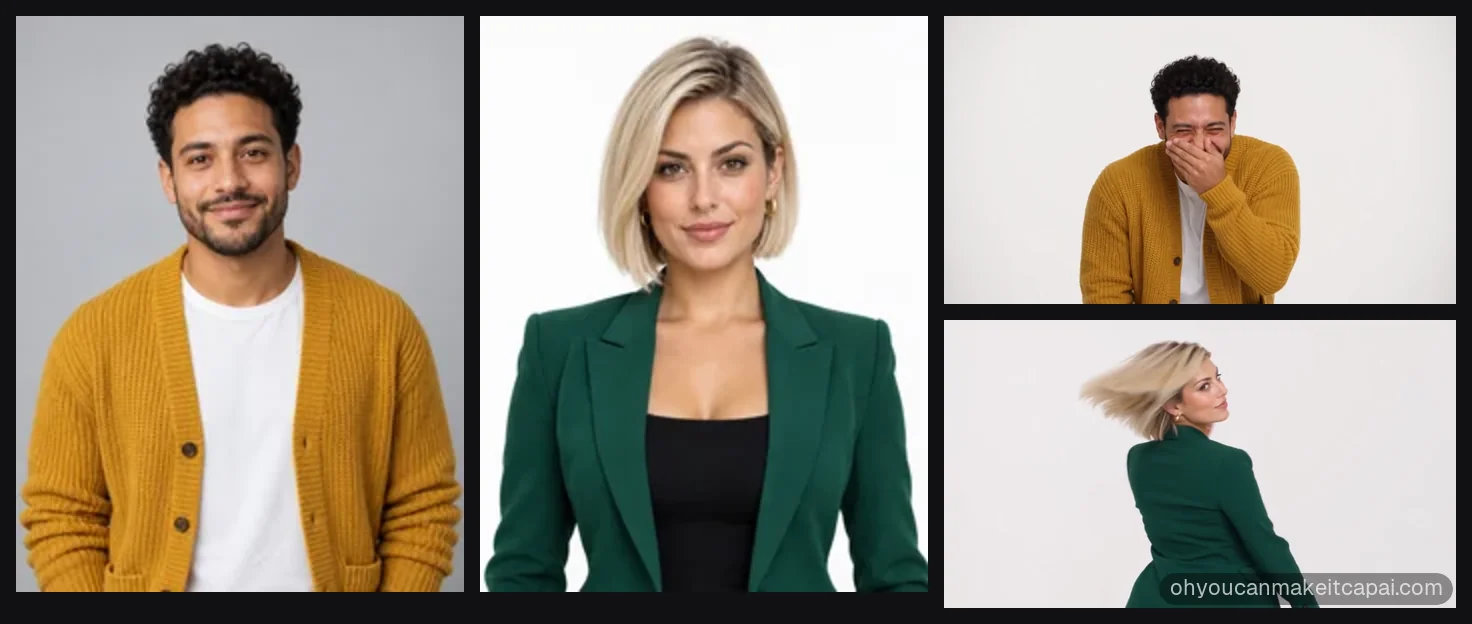
We tested the tool with a pair of AI-generated people. Photo 1 was a man with curly hair in a mustard cardigan. Photo 2 was a woman with a platinum bob in a green blazer. Both faces, hairstyles and outfits carried over into all 11 shots.
The 720p video took about 4.5 minutes to generate. After that, our system found the cuts and moved the sound 0.35 seconds to match them. It also leveled the volume to about -14 LUFS, a common loudness target for social video.
How to choose your photos
Photo quality decides most of the likeness. These rules come from what our photo check accepts and what gave the best results in testing.
- One adult per photo, facing the camera.
- Sharp focus and even light, with no heavy filters.
- Head and upper body in frame, so the outfit carries over.
- JPG, PNG, WebP or HEIC, up to 10 MB each.
- No children, group photos or pets.
- Only photos you have the right to use.
Which format to pick
Pick vertical 9:16 for TikTok, Reels and Shorts. Pick horizontal 16:9 for YouTube and X. A horizontal video also comes with two vertical downloads on its video page: one stacked and one with a blurred background.
480p is fine for a quick laugh in a group chat. 720p looks sharper on a full phone screen and uses 6 credits instead of 3.
Step by step
The whole flow happens on the home page. You only need a Google account to sign in.
1. Upload one or two photos
Drop Photo 1 into the laughing slot and Photo 2 into the spinning slot. Each photo is checked right away. A photo that fails the check never costs anything.
2. Choose the format and quality
Pick 9:16 or 16:9, then 480p or 720p. The button shows the price of the video before you pay.
3. Buy a pack if you need one
If your balance is too low, you buy a pack once. Packs start at $10, and the video starts right after checkout.
4. Wait or close the page
Most videos finish within 15 minutes. The preview box shows progress, and we email you when the video is done.
5. Download and post
Play it in the preview box, then download the MP4. My videos keeps a copy for 30 days.
Before you post
A quick check saves you a second try. Watch the video once with sound before you share it.
- Check that each face looks like the right person.
- Ask the friend in Photo 2 before you post them spinning.
- Post the vertical download on short-video apps.
- Tag it as an AI remake so nobody mistakes it for real footage.
FAQs
How long does an oh you can make it cap AI video take?
An oh you can make it cap AI video usually takes 5 to 15 minutes. Our own 720p test needed roughly four and a half minutes, plus a short sound-alignment step.
Do I need two photos?
Two photos are not required. A single photo works once you switch on "Just me".
Why does the order of the photos matter?
Photo order decides the roles. The first photo is always cast as the laugher, and the second as the spinner.
What if the face does not look right?
A face that does not look right is usually caused by a small, dark or tilted photo. Try a sharp, front-facing photo with even light. A failed video costs nothing.
Can I make the video vertical for TikTok?
The video can be vertical for TikTok. Pick 9:16 before you generate, or use the stacked or blurred 9:16 download of a horizontal video.