Guide
Oh You Can Make It Cap AI Video Examples
These oh you can make it cap AI video examples show what a finished 15-second video looks like. We went through our own example frame by frame. You can see what comes from your photos, where the cuts fall and which flaws we have met. Every number on this page comes from our own tests.
Last updated: Oct 29, 2026
Key facts
- Our public example is built from two AI-generated portraits and runs 15 seconds at 720p in 16:9.
- The example took about 263 seconds to generate and holds 11 single-person shots that alternate between two people.
- Scene detection found 10 cuts in the example, the first at 1.71 seconds and the last at 14.50 seconds.
- The finished file is 1280 by 720 H.264 with AAC sound, and its loudness is -13.8 LUFS.
- Post-processing found our cuts ahead of the source clip and moved the sound by the same gap.
Oh you can make it cap AI video examples at a glance
Our oh you can make it cap AI video examples are a small set. Each one answers a different question. One public video shows what a clean result looks like. Two short loops show one role up close. A few internal tests show what can go wrong.
The public video is the one on the home page. It is also the preview you see before you upload anything. We built it from two photos of made-up people, so no real person appears in it.
- Public video: 15 seconds, 16:9, 720p, with sound.
- Laugh loop: three shots of the laughing person joined into a 3.46-second silent clip.
- Spin loop: the full spin of the second person, 3.00 seconds, silent.
- Internal tests: three more 720p videos that we do not publish.
The two photos behind our public video
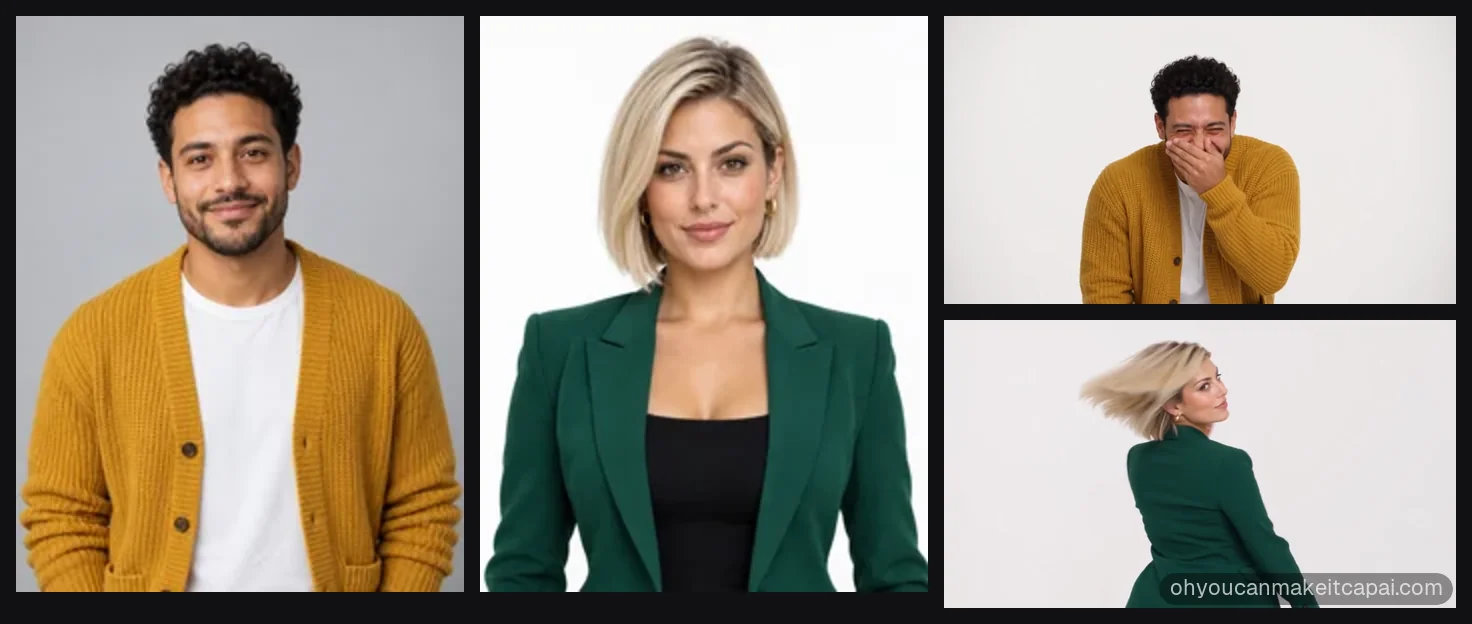
Photo 1 shows a man with curly hair and a short beard. He wears a mustard chunky cardigan over a white T-shirt. Photo 2 shows a woman with a platinum wavy bob. She wears an emerald blazer over a black top. Both people are AI-generated. Both face the camera and fill the frame from the chest up.
The man plays Person A, who laughs. The woman plays Person B, who spins. We chose 16:9 at 720p, which uses 6 credits. If you have not seen the original clip, the meme guide explains the two roles.
After generation, post-processing ran. The final file is 1280 by 720 and 15.07 seconds long. It is encoded as H.264 with AAC sound.
Shot by shot: what happens in our public video
The video cuts between 11 shots with one person in each. Person A and Person B alternate, and Person A closes. No shot shows both people together. There is no split screen. The list gives the start time of each shot, in seconds, from our scene detection. It also says what one frame shows.
- From 0.00, A: points at the other person.
- From 1.71, B: turns away, spins and looks back over a shoulder.
- From 4.79, A: rubs the chin and holds back a laugh.
- From 5.92, B: speaks with both hands in front of the chest.
- From 7.08, A: covers the mouth and laughs hard.
- From 8.25, B: speaks with a small round object in hand.
- From 9.54, A: raises a hand beside the ear and laughs.
- From 10.88, B: holds the object and looks pleased with herself.
- From 11.92, A: laughs wide and points.
- From 13.29, B: speaks again with the object.
- From 14.50, A: stands in full view for the last beat.

The spin is the longest shot
Person B spins for 3.08 seconds, from 1.71 to 4.79. Each other shot runs 0.57 to 1.37 seconds. The spin is the best place to judge how hair and jacket hold up in motion.
The laughing shots are short
Person A never gets more than 1.37 seconds in one go. That is why our laugh loop joins three separate shots. In them the person bites a finger, laughs behind a hand and laughs beside the ear.
The last shot is a full-body view
The final shot lasts about half a second. It shows Person A standing in full view. Your photo stops at the chest, so the video has to invent the rest.
What carries over from your photos
In our oh you can make it cap AI video examples, both people matched their photos. The faces stayed the same in all 11 shots. The curly hair, the beard and the platinum bob kept their shape. The mustard cardigan and the emerald blazer kept their colors.
Anything the photo shows can carry over. Anything it hides has to be made up. A photo cut off at the chest says nothing about shoes or legs. The same goes for the room. The shots sit in a white studio, as in the source clip. Your own background does not move into the video.
Face and expression
The face comes from the photo, but the expression does not. The video decides when to laugh, point or look smug. Your photo only has to make the face easy to read.
Hair and clothes
Hair and clothes are the easiest parts to check. Compare the colors and the cut in a still frame next to your photo. In the spin, the hair showed from a new angle and still looked right.
Cut rhythm in oh you can make it cap AI video examples
We ran scene detection on the source clip and on our example. The source has 10 transitions, at 1.93, 3.17, 5.07, 6.27, 8.63, 10.00, 11.47, about 12.2, 13.77 and about 14.45 seconds. Our example has 10 cuts too, at 1.71, 4.79, 5.92, 7.08, 8.25, 9.54, 10.88, 11.92, 13.29 and 14.50 seconds.
The structure matches, and the timing mostly does not. The first cut comes 0.22 seconds early. The long spin pushes the third and fourth cuts about 0.8 seconds late. Cuts five to nine land 0.28 to 0.59 seconds ahead of the source. The last cut is within 0.05 seconds of it.
The total stays at 15 seconds, so the video still feels like the clip. An early version of our prompt listed only seven shots. That video matched just 4 of the 10 transitions and ended with a ghost image. After we switched to 11 shots, the structure matched. The prompts guide shows how the shots are written.
How the sound lines up with the cuts
The sound in the finished video is the original soundtrack. It is not new audio. Our system measures where the generated cuts fall and compares them with the source cuts.
In our example, the cuts landed 0.35 seconds early. That is above our threshold of 0.3 seconds. So the sound moved 0.35 seconds forward, and the beats meet the cuts again. Then the volume was leveled to -13.8 LUFS, close to the usual -14 target for social video.
What one person playing both roles looks like
One of our internal tests used a single photo for both roles. The shot structure came out right. We could tell the laughing person from the spinning person.
You switch this on with "Just me" before you upload. The same face then plays both parts, and the cost stays at 6 credits for 720p. The how-to guide shows where the switch sits.
Flaws we have seen and how to handle them
Of the four oh you can make it cap AI video examples we made at 720p, two were clean. Two had a flaw. We list both here, so you know what to look for before you post.
The flaws appeared with photos we do not publish. We cannot say that a flaw will never happen to you. If a video looks wrong, the troubleshooting guide lists the causes we know. If generation fails, the credits come back automatically.
Ghosting in the middle
In one test, several dissolves in the middle left a see-through double image for a moment. The shot structure was still right. Watch the dissolves between shots before you share.
A wide shot at the very end
In another test, the last half second pulled out to a wide view. A black area of the studio edge showed in the top left corner. Play the ending once at full size before you share.
A wrong shot count
This one was our own mistake. The early seven-shot prompt gave a video with the wrong rhythm and a ghost ending. The live prompt now writes all 11 shots, and the structure matched in every video we made after that.
Choose photos that look like our example
Our two example photos follow the same rules. Each shows one adult, facing the camera, sharp, in even light. The frame runs from the head to the chest. Nothing covers the face.
That is the safest start. The how-to guide lists the accepted formats, the size limit and the photo check. A photo that fails the check never costs credits.
Make your own from two photos
Your video will not copy our oh you can make it cap AI video examples, but it follows the same plan. It has 15 seconds, 11 shots, the original sound and no watermark. At current pack prices, a 720p video costs $8 to $12. A 480p video costs $4 to $6.
You can try it on the home page. Most videos are ready in 5 to 15 minutes, and we email you when yours is done. If you want to know how the clip spread, read the trend timeline.
FAQs
What do oh you can make it cap AI video examples show?
Oh you can make it cap AI video examples show a 15-second video with 11 shots. Two people alternate, and the first person finishes. Our public example matches both source photos and has sound.
Are the people in your example real?
The people in our public example are not real. Both portraits were generated by AI, so no real person appears in the example.
How long did the example take to make?
Our 720p example needed roughly 263 seconds of generation, a little over four minutes. Post-processing came next. It lined up the sound and leveled the volume.
Does the example have sound?
The public example has sound. It is the original soundtrack, shifted to match our cuts. The two short loops on the home page are silent.
Will my video look the same as the example?
A video made from your photos follows the same plan as our oh you can make it cap AI video examples. It shows your people. Faces, hair and clothes come from your photos. The room, the motions and the timing come from the plan.
Can one photo play both roles?
One photo can play both roles when you switch on "Just me". In our single-photo test, the shots came out in order. The two roles were easy to tell apart.
Do the examples ever have glitches?
Two of our oh you can make it cap AI video examples had glitches. One had double images in the middle dissolves. Another widened to a far view in the last half second and showed a black studio edge.